Everything You Need to Know About Smartphone Camera Shutter Speed
In today’s fast-paced world, smartphone cameras have become incredibly sophisticated. From taking quick snapshots to capturing beautiful landscapes and even high-speed action, the camera is one of the most used features of any smartphone. One of the key elements that influence the quality of your photos is shutter speed. Understanding how it works can significantly improve your photography skills, enabling you to capture the perfect shot every time.
In this article, we’ll explore the concept of smartphone camera shutter speed, how it affects your photos, and how you can use it to take better pictures.

What Is Shutter Speed in Smartphone Cameras?
Shutter speed refers to the amount of time your smartphone camera’s sensor is exposed to light when capturing an image. It’s measured in fractions of a second, such as 1/1000, 1/500, 1/60, and so on. A fast shutter speed, like 1/1000, captures an image very quickly, freezing motion and reducing blur. On the other hand, a slow shutter speed, like 1/30, allows more light to hit the sensor, making the image brighter but also increasing the chance of motion blur.
Shutter speed is crucial in determining how your photos will turn out in different lighting conditions. It plays a significant role in managing motion, light exposure, and the overall sharpness of the photo.
How Does Shutter Speed Affect Your Photos?
1. Motion Blur vs. Freeze Motion
One of the primary ways shutter speed affects your photos is by either freezing motion or allowing motion blur. A fast shutter speed is ideal for capturing fast-moving subjects like a speeding car, a bouncing ball, or a person running. It allows you to freeze the motion and capture the action in crisp detail.
Conversely, a slow shutter speed is better for creating a sense of motion in your photos. For instance, if you’re taking a picture of a waterfall, a slow shutter speed will blur the movement of the water, creating a smooth, ethereal effect.
Fast Shutter Speed:
-
Captures motion-free images.
-
Ideal for action shots (sports, moving vehicles).
-
Requires good lighting to avoid underexposure.
Slow Shutter Speed:
-
Allows for motion blur.
-
Ideal for night photography or creating artistic effects (e.g., light trails).
-
Needs a stable hand or tripod to avoid camera shake.

2. Exposure Control
Shutter speed also plays a vital role in controlling the exposure of your photos. The longer the exposure, the more light the camera sensor receives, which can result in brighter images. However, this can also lead to overexposure if you’re not careful, especially in bright conditions.
If you’re in a well-lit environment, like outdoors in the afternoon, you’ll need a faster shutter speed (e.g., 1/500 or faster) to avoid overexposing your photo. On the other hand, in low-light settings, you may need a slower shutter speed (e.g., 1/30 or 1/60) to allow more light to reach the sensor.
3. Low Light Photography
In low light conditions, using a slow shutter speed helps to capture more light. However, if you’re not using a tripod or stabilizing the camera, you may get motion blur. Modern smartphones often have built-in image stabilization to help combat this issue and provide clearer shots in low-light situations.
For clearer photos in dimly lit environments, smartphones with manual camera settings or Pro Mode allow you to adjust the shutter speed manually, offering more control over your shots.
How to Adjust Shutter Speed on Your Smartphone
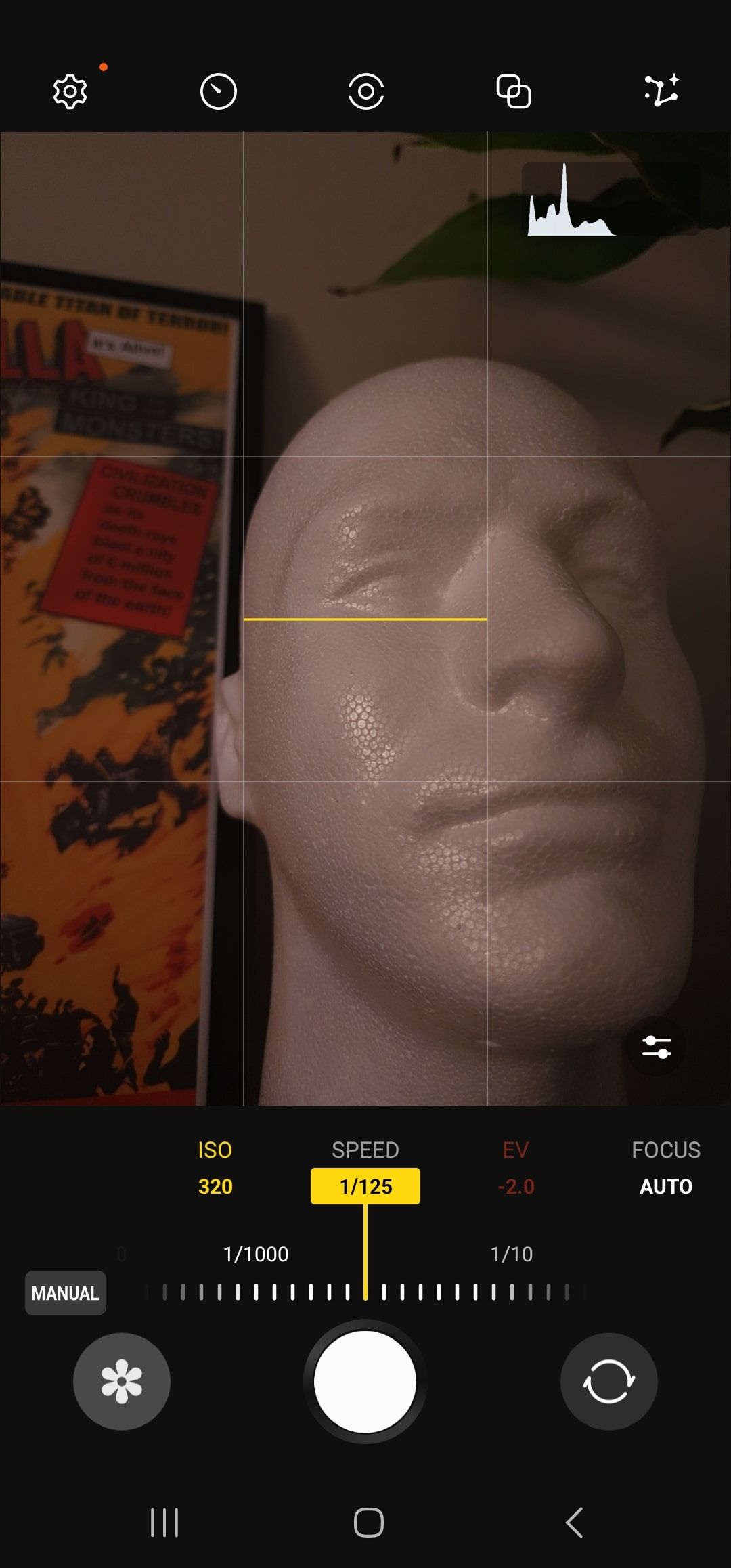
Many modern smartphones come with manual camera settings, also known as Pro Mode or Manual Mode. This mode allows you to adjust various settings, including shutter speed, ISO, and aperture.
Steps to Adjust Shutter Speed:
-
Open your camera app and switch to Pro Mode or Manual Mode.
-
Look for the shutter speed option, usually represented by “S” or “1/” followed by numbers.
-
Adjust the shutter speed by either sliding the control or entering a specific value (e.g., 1/1000 for fast motion or 1/30 for low light).
-
Focus on your subject, ensure stability, and take the shot.
Pro Mode Features:
-
Manual shutter speed adjustment.
-
ISO control to adjust exposure sensitivity.
-
White balance control for accurate colors.
-
Focus control for precise results.

Tips for Mastering Shutter Speed
1. Use a Tripod for Slow Shutter Speeds
When using slow shutter speeds (e.g., 1/30 or slower), your camera needs to stay still to avoid motion blur caused by shaky hands. A tripod or another stable surface will help ensure the camera doesn’t move during the exposure time.
2. Consider Lighting Conditions
Your shutter speed should depend on the lighting conditions. In bright daylight, you’ll need a faster shutter speed to avoid overexposure. In dim or low light, slow your shutter speed to let in more light, but be mindful of potential blur if the scene involves movement.
3. Experiment with Motion Effects
Don’t be afraid to experiment with motion blur. For example, try using a slow shutter speed to capture the smooth movement of water, like in a waterfall shot, or to create light trails from car headlights at night.
4. Stabilize Your Phone
If you don’t have a tripod, try using your surroundings to stabilize your phone. Lean against a wall, or place your phone on a flat surface to avoid unwanted movement while shooting with slow shutter speeds.
Common Mistakes to Avoid
1. Using Too Slow of a Shutter Speed Without Stabilization
While slow shutter speeds are excellent for capturing motion effects, using them without proper stabilization can lead to blurry photos. Always make sure to use a tripod or keep your phone as steady as possible when shooting at slower speeds.
2. Forgetting to Adjust ISO for Lighting Conditions
Shutter speed works hand in hand with ISO (which controls the camera’s sensitivity to light). If you use a slow shutter speed in bright light, you’ll need to adjust the ISO to prevent overexposure. Similarly, in low light, you may need to raise the ISO to balance the exposure.
Frequently Asked Questions (FAQs)
Q1: What is the ideal shutter speed for low-light photography?
In low-light conditions, you’ll typically want to use a slower shutter speed, such as 1/30 or 1/60. This allows more light to reach the sensor, brightening the photo. However, be sure to stabilize your phone to prevent blur.
Q2: Can I change the shutter speed on my smartphone?
Yes, many smartphones with Pro Mode or Manual Mode allow you to adjust the shutter speed manually. Look for the shutter speed control in the camera app settings.
Q3: How do I reduce motion blur in action shots?
To freeze fast-moving subjects, use a fast shutter speed such as 1/1000 or faster. This will prevent motion blur and ensure the subject appears sharp.
Q4: How does shutter speed affect exposure?
A slower shutter speed lets in more light, increasing exposure and making the photo brighter. Conversely, a faster shutter speed reduces exposure and can make the photo darker.
Conclusion
Understanding shutter speed is essential for any smartphone photographer looking to improve their photos. Whether you’re capturing fast action or experimenting with long exposures, mastering shutter speed will help you achieve the desired effects. With modern smartphones offering manual controls, it’s easier than ever to take your photography to the next level.
By adjusting your shutter speed, you can ensure the perfect shot every time, no matter the lighting conditions or subject. Experiment, explore, and let your creativity shine!