
Smartphone Camera Portrait Bokeh: Mastering the Art of Perfect Portraits
In the world of smartphone photography, portrait bokeh has become one of the most sought-after features. Bokeh, derived from the Japanese word for “blur,” refers to the aesthetic quality of the out-of-focus areas in a photo. When used correctly, it can create stunning, professional-looking portraits with a beautifully blurred background. In this guide, we’ll dive deep into portrait bokeh, how it works, and which smartphones offer the best bokeh effects for stunning portrait photography.
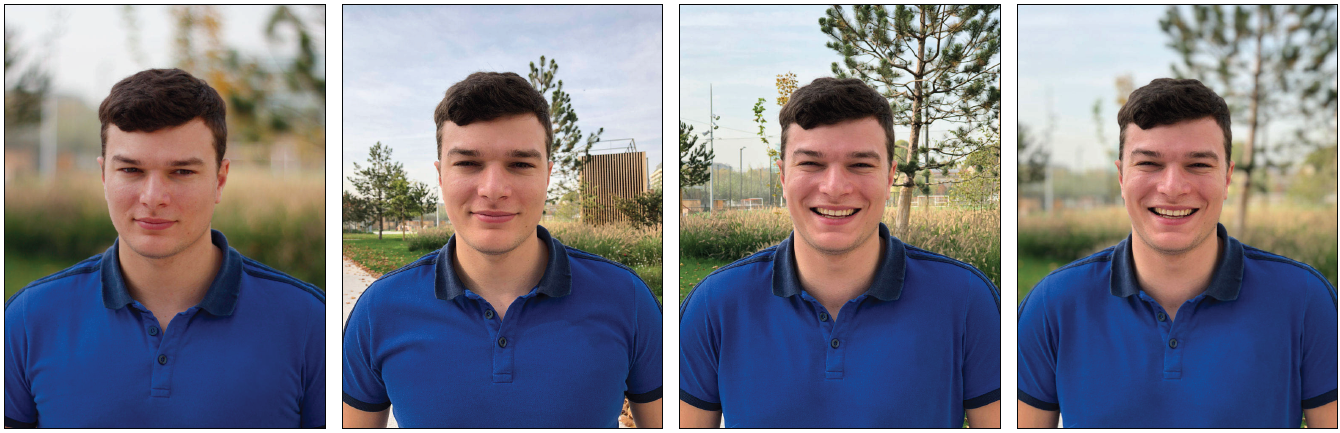
What is Portrait Bokeh?
Portrait bokeh is the effect of a blurred background in a photograph, commonly used to highlight the subject. This blur helps draw attention to the subject’s face, making it stand out against the softer backdrop. While professional photographers use expensive cameras with large apertures to achieve this effect, modern smartphones have made it accessible to everyone with software and hardware advancements.
In portrait mode, smartphones use algorithms and dual-camera systems to simulate the effect of a shallow depth of field. The result is a beautifully blurred background that makes portraits look more polished, much like those captured with high-end DSLR cameras.
How Does Smartphone Portrait Bokeh Work?
Smartphones use a combination of hardware and software to create portrait bokeh effects. Here’s a breakdown of how it works:
1. Dual-Camera Setup
Many smartphones today come equipped with a dual-camera system, typically consisting of a primary camera and a secondary telephoto or depth sensor camera. The depth sensor helps the phone calculate the distance between the subject and the background, allowing it to blur the background accordingly.
2. Software Algorithms
Modern smartphones rely heavily on artificial intelligence (AI) and advanced algorithms to enhance the bokeh effect. These algorithms detect edges, blur out the background in a natural way, and even fine-tune the focus around the subject for a professional finish.
3. Aperture Control
Smartphones with larger apertures (such as f/1.7 or f/1.8) can gather more light and create a shallower depth of field, which results in a stronger bokeh effect. Some phones also allow you to manually adjust the aperture in portrait mode to control the strength of the blur.
The Best Smartphones for Portrait Bokeh
1. iPhone 14 Pro Max
Apple has long been a leader in mobile photography, and the iPhone 14 Pro Max takes portrait photography to new heights. The TrueDepth camera system combined with the A16 Bionic chip provides stunning portrait bokeh effects. The ProRAW mode also allows for more control over the bokeh effect, making it perfect for professional-quality portraits.
-
Dual-Camera System: 12MP primary camera + 12MP telephoto
-
Portrait Mode: Enhanced AI for realistic bokeh
-
Depth Control: Adjustable f-stop

2. Google Pixel 7 Pro
The Google Pixel 7 Pro is another excellent option for those looking for superb portrait bokeh. Powered by Google’s Tensor G2 chip and enhanced by its software, the Pixel 7 Pro creates natural bokeh effects with incredible edge detection and background blur. The Portrait Mode on the Pixel 7 Pro is renowned for its ability to accurately replicate the depth and blur typically seen in professional cameras.
-
Camera Setup: 50MP primary camera + 48MP telephoto lens
-
AI Enhancement: Advanced bokeh algorithms
-
Portrait Mode: Natural-looking blur with AI adjustments
3. Samsung Galaxy S23 Ultra
Samsung’s Galaxy S23 Ultra continues to impress with its photography capabilities, including stunning portrait bokeh effects. With a 200MP primary sensor and a 12MP ultra-wide camera, it captures stunning details and creates a realistic bokeh effect. The smartphone’s Dual Pixel AF ensures that the subject remains sharp while the background is beautifully blurred.
-
Camera Setup: 200MP main sensor + 12MP ultra-wide
-
Portrait Mode: Dual Pixel autofocus for accurate depth
-
AI Tools: Customizable bokeh effects
4. OnePlus 11
The OnePlus 11 is a budget-friendly option that doesn’t compromise on quality. Its 50MP main camera combined with OIS (Optical Image Stabilization) helps deliver sharp portraits with creamy bokeh effects. The camera’s AI enhancements allow it to create professional-looking portrait shots without the need for additional post-processing.
-
Camera Setup: 50MP primary + 48MP ultra-wide
-
Portrait Mode: Realistic bokeh and edge detection
-
Software Enhancements: AI-driven portrait adjustments
How to Achieve the Best Portrait Bokeh on Your Smartphone
If you’re looking to maximize your smartphone’s portrait bokeh potential, follow these tips:
1. Get Close to the Subject
The closer you are to the subject, the more pronounced the bokeh effect will be. Make sure to position the subject in a way that isolates them from the background.
2. Choose the Right Lighting
Good lighting is essential for achieving a stunning portrait. Natural light works best, but if you’re indoors, make sure your subject is well-lit without harsh shadows.
3. Use Portrait Mode Properly
Most smartphones have a dedicated portrait mode. This mode adjusts the camera’s settings automatically for the best bokeh effect. Ensure you’re using portrait mode correctly, and avoid using zoom too much, as it can reduce the quality of the effect.
4. Adjust Bokeh Strength
Some phones allow you to adjust the bokeh strength either before or after the photo is taken. Experiment with different settings to find the perfect balance between a sharp subject and a smooth blur.
Tips for Editing Portrait Bokeh
While smartphone portrait bokeh is impressive, a little editing can go a long way. Many phones come with built-in tools to fine-tune the bokeh effect. Here are some tips:
-
Increase the Blur: If the background blur is too subtle, you can increase the blur strength using the editing tools in the camera app or third-party apps like Snapseed or Lightroom.
-
Refine the Edges: Pay attention to the edges of your subject. If they’re too harsh or have an unnatural outline, use a feathering tool to smooth out the edges.
-
Adjust the Lighting: If your subject looks too dark or too bright, adjust the exposure to achieve a more balanced look.
Frequently Asked Questions (FAQs)
1. What is the difference between portrait bokeh and regular background blur?
Portrait bokeh specifically refers to the artistic quality of the background blur in portraits. It’s meant to isolate the subject and create a pleasing effect. Regular background blur can happen in any photo, but it’s not as intentionally designed to enhance the subject like bokeh in portraits.
2. How does a dual-camera system help create bokeh?
A dual-camera system uses one camera for focusing on the subject and another to measure the distance between the subject and the background. This depth information allows the phone to blur the background while keeping the subject sharp, mimicking the effect of a professional DSLR.
3. Can you adjust the bokeh effect after taking the photo?
Yes, many smartphones allow you to adjust the bokeh effect after the photo is taken. This can be done through portrait mode settings or within the phone’s photo editor.
4. Which smartphone has the best bokeh effect?
The iPhone 14 Pro Max, Google Pixel 7 Pro, and Samsung Galaxy S23 Ultra all offer outstanding portrait bokeh, thanks to their advanced camera systems and AI algorithms.
5. Does portrait bokeh work in all lighting conditions?
While portrait bokeh works best in natural light, modern smartphones are equipped with advanced sensors and AI that allow them to perform well in low light as well. However, bright and soft lighting typically yields the best results.
Conclusion
Portrait bokeh is a game-changer for mobile photography, allowing users to create professional-quality portraits without needing a DSLR camera. Whether you’re using an iPhone 14 Pro Max, Google Pixel 7 Pro, or Samsung Galaxy S23 Ultra, today’s smartphones offer incredible bokeh effects that enhance your portraits. By following the tips above and experimenting with your phone’s settings, you can capture stunning photos with a beautiful background blur that makes your subject pop.
For more photography tips and guides, check out our other articles on smartphone photography and camera settings.