
Smartphone Battery Health Review: How to Maintain and Maximize Battery Lifespan
In today’s fast-paced world, smartphones have become an essential part of our daily lives. Whether you’re using your phone for communication, entertainment, or work, the battery health of your device plays a crucial role in how well it performs over time. However, like any other component, a smartphone’s battery deteriorates with use. In this comprehensive guide, we’ll review how smartphone battery health impacts your device’s performance and how you can maintain it to maximize its lifespan.
What Is Smartphone Battery Health?
Smartphone battery health refers to the capacity of your battery to hold charge compared to when it was brand new. Over time, a battery’s maximum capacity will naturally degrade due to repeated charging and discharging cycles. This means that your phone’s battery will gradually lose its ability to last as long on a single charge, which can affect its performance and usability.
Understanding battery health is crucial because it helps you manage expectations and make informed decisions about when to replace your battery or take other actions to optimize its performance.
Why Does Battery Health Matter?
As your smartphone battery degrades, several things can happen:
-
Reduced Battery Life: The most noticeable effect of poor battery health is a decrease in battery life. Your phone may need charging more frequently than it did when it was new.
-
Performance Throttling: Some smartphones, especially iPhones, will automatically throttle performance to prevent the battery from failing abruptly. This can result in slower speeds and longer app loading times.
-
Unexpected Shutdowns: In extreme cases, a deteriorated battery might cause your phone to shut down unexpectedly, even when there’s still a significant amount of battery percentage remaining.
By understanding your battery’s health, you can avoid these problems and prolong the lifespan of your device.
How to Check Your Smartphone’s Battery Health
Checking the health of your smartphone’s battery is easier than you might think. Here’s how you can do it on some of the most popular devices:
1. iPhone Battery Health Check
For iPhone users, Apple provides a built-in feature to check battery health.
-
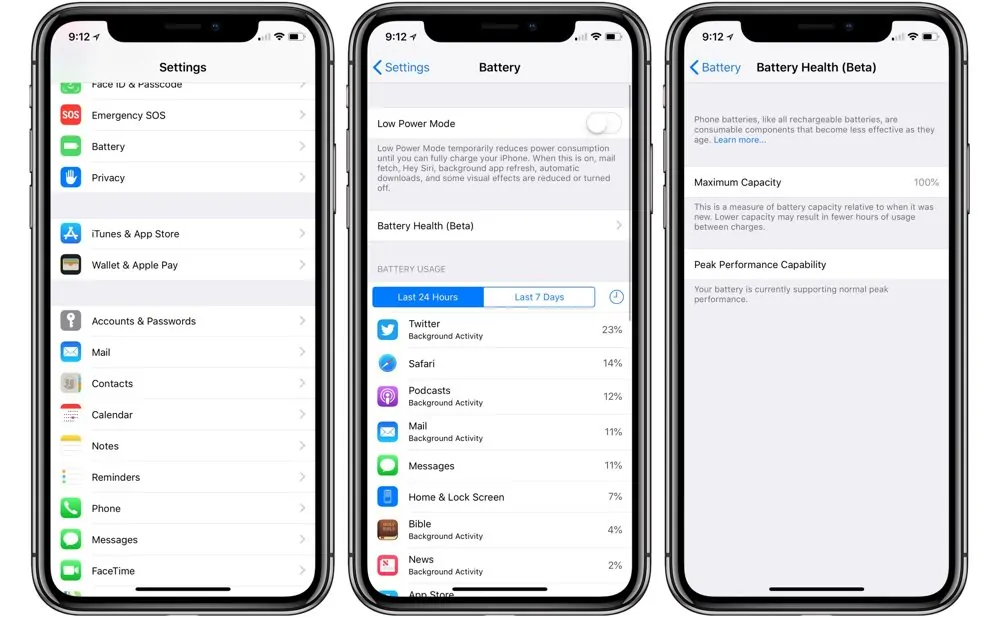
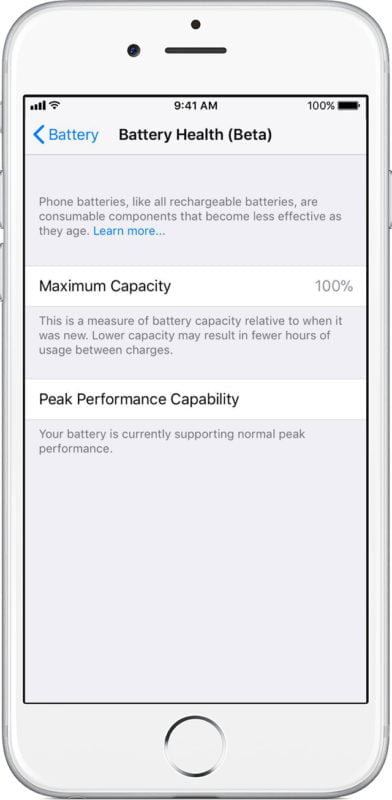
Go to Settings > Battery > Battery Health & Charging.
-
Here, you’ll see your battery’s Maximum Capacity and whether it is optimized for performance. If the health percentage is below 80%, Apple recommends replacing the battery.
2. Android Battery Health Check
Unlike iPhones, Android phones don’t have a universal battery health check feature. However, some manufacturers like Samsung and OnePlus offer battery health checks through their device settings.
-
Go to Settings > Device Care > Battery (Samsung) or Settings > About Phone > Battery (OnePlus).
-
You might find information on battery usage, health, and tips for improving battery longevity.
3. Third-Party Apps
If your smartphone doesn’t have a built-in feature, there are several third-party apps available for both Android and iOS that can help you check your battery’s health, such as AccuBattery for Android and CoconutBattery for macOS/iOS.
How to Improve Smartphone Battery Health
Maintaining good smartphone battery health doesn’t require major adjustments, but small daily habits can go a long way in preserving your battery’s lifespan. Here are some tips:
1. Avoid Overcharging Your Phone
While modern smartphones are designed to handle overcharging, consistently charging your phone to 100% and leaving it plugged in for long periods can cause stress to the battery. Aim to keep your battery between 20% and 80% for optimal health.
2. Use Optimized Charging Features
Many smartphones, including iPhones and Android devices, offer optimized charging features that learn your charging habits and reduce stress on the battery. Enabling this feature can prevent your phone from charging to 100% too quickly, which helps prolong battery life.
3. Turn Off Background Apps
Apps running in the background can drain your battery without you realizing it. Close unused apps regularly, and disable background app refresh for apps that you don’t need running constantly.
4. Reduce Screen Brightness
The display is one of the largest battery drainers on your smartphone. Reduce the screen brightness or use auto-brightness to let your phone adjust it based on your environment. This will significantly reduce power consumption.
5. Enable Battery Saver Mode
Both iOS and Android devices offer a battery saver mode that reduces background activity and dims the screen to save power. Use this feature when your battery is running low or when you don’t need to use your phone intensively.
How to Maximize Battery Lifespan
Even with proper maintenance, all batteries eventually lose their capacity. However, there are still ways to maximize your smartphone’s battery lifespan:
1. Avoid Extreme Temperatures
Heat is a major factor that contributes to battery degradation. Avoid exposing your phone to direct sunlight for extended periods and try not to charge it in hot environments. Similarly, extremely cold temperatures can also damage the battery.
2. Update Software Regularly
Manufacturers often release software updates that improve battery performance and efficiency. Always keep your phone’s operating system up to date to take advantage of these improvements.
3. Use the Right Charger
Always use the official charger or a certified third-party charger that meets your phone’s power requirements. Cheap or non-certified chargers can cause issues with your battery’s health and overall performance.
What to Do If Your Battery Health Is Poor
If your smartphone battery health drops significantly, you might notice performance issues, such as slow app loading or reduced battery life. Here are your options:
1. Replace the Battery
If your smartphone is still under warranty or an extended service plan, you can often get your battery replaced for free or at a reduced cost. For older devices, battery replacement is usually the most effective solution.
2. Use Battery Case or External Battery Pack
If replacing the battery is not an option, you can consider using a battery case or external battery pack to extend your device’s usage.
Frequently Asked Questions (FAQs)
Q1: How often should I replace my smartphone’s battery?
A: It depends on your usage. However, if your battery health falls below 80%, it’s generally a good idea to replace it to maintain optimal performance.
Q2: Does charging my phone overnight damage the battery?
A: Modern smartphones are designed to prevent overcharging, but leaving your phone plugged in for long periods regularly can still put stress on the battery. Try to avoid charging overnight unless necessary.
Q3: What’s the average lifespan of a smartphone battery?
A: On average, a smartphone battery will last 2-3 years before its capacity noticeably declines. However, with proper care, you can extend the battery’s lifespan.
Q4: Can I use my phone while it’s charging?
A: Yes, but using your phone while charging can generate extra heat, which might contribute to faster battery degradation over time. It’s best to avoid resource-heavy tasks like gaming while charging.
Conclusion
Smartphone battery health is an often overlooked but essential factor in maintaining a good user experience. By regularly checking your battery health, making small adjustments to your usage habits, and taking advantage of smartphone features designed to optimize battery life, you can keep your phone running at its best for longer.
Always remember, good battery practices today can lead to fewer problems tomorrow! If your phone’s battery health starts to degrade significantly, consider a battery replacement to ensure continued optimal performance. Happy charging!